FLYNC Examples
Welcome to the configuration examples and tutorials! This section walks you through practical usage of the FLYNC configuration system with real examples.
Base Example
This example provides a fully functional reference configuration that can be used as a baseline when developing your own system setup. It demonstrates how multiple networking features can be integrated into a cohesive design, helping you understand both structure and implementation details.
The configuration includes the following key components:
Ethernet Network Topology - Illustrates how devices are interconnected, including port roles, link relationships, and overall network structure. This serves as a guide for designing scalable and deterministic Ethernet architectures.
Time Synchronization - Shows how gPTP configuration is defined and maintained across the network.
MACsec - Shows the configuration of MACsec-aware nodes of the system for link protection.
Quality of Service (QoS), Layer 2 TSN, and TCAM Usage - Provides sample configurations for traffic prioritization and deterministic networking using Time-Sensitive Networking (TSN) features. It also illustrates how TCAM rules can be allocated and used for traffic classification and filtering. You can use this configuration as a starting point, adapting interface mappings, policies, and feature parameters to match the specific requirements of your hardware platform and application.
Network Management (NM) - Shows how an NM message is modeled vendor-neutral as an ordinary PDU with ordinary signals, tagged via the
pdu_usage/frame_usagefields, and bound to both Ethernet and CAN transports.Signals, PDUs and CAN Communication - Shows how bus-agnostic signals are grouped into PDUs and carried by CAN and CAN FD frames, and how the same PDUs are packed into Ethernet container PDUs.
10BASE-T1S Multidrop - Shows a shared single-pair segment carrying three rear lamp modules and the zone controller that coordinates them. It covers the PLCA parameters every node agrees on, the per-node node id on each port’s PHY, and how the whole segment enrolls in network management as a single participant.
Example Configuration
Find an example configuration directly in github.
Ethernet Network Topology
The Ethernet Network Topology diagram provides a comprehensive visual representation of all components included in the configuration.
The diagram identifies the VLANs, IP addresses, and multicast groups assigned to each controller and switch, giving a complete view of the logical network segmentation and addressing scheme.
Each ECU is shown as an individual block. The diagram also illustrates the internal connectivity between components within each ECU, as well as the external connections between ECUs, making both intra-ECU and inter-ECU communication paths easy to understand.

QoS/L2 TSN and TCAM Configuration
The QoS / Layer 2 TSN and TCAM Configuration diagram provides a comprehensive visual overview of the Time-Sensitive Networking (TSN) mechanisms and TCAM rules implemented in this configuration.
The diagram highlights the HTB (Hierarchical Token Bucket) shaper configured on the Linux-based controllers (eth_ecu), as well as the Credit-Based Shapers (CBS) applied on the egress ports of the switches to manage time-sensitive traffic.
It also shows the ingress stream filters deployed on the ingress ports of the switches, which are used for traffic policing and stream identification in accordance with TSN requirements.
In addition, the diagram includes the TCAM rules configured on the switch (z2_switch1), illustrating how hardware-based classification and filtering are used to enforce traffic handling policies.

Time Synchronization Configuration
The Timesync Configuration diagram provides a clear visual overview of the time-synchronization roles assigned to all time-aware devices in the system.
It illustrates how time is distributed across the network, identifying which devices act as time-transmitters or time_receivers.
This helps clarify the synchronization hierarchy and the timing relationships between system components.

MACsec Configuration
The MACsec Configuration diagram provides a clear visual overview of the roles and relationships of all MACsec participants within the system.
It identifies which devices function as MACsec peers, showing where secure channels are established and how link-layer protection is applied across the network.
This helps clarify the security topology and illustrates how data integrity (and confidentiality) is maintained between connected nodes.

Ethernet Multidrop Segment
The rear lamps sit on a shared single-pair segment rather than on a link of their own. Three lamp modules and one
port of zonal_platform1 share one twisted pair, and PLCA (IEEE 802.3-2022 Clause 148) gives each of them a
transmit opportunity in turn, so the medium carries no collisions.
The segment as the model derives it — the medium, and every node ordered by the transmit opportunity it holds:
        graph TD
    MEDIUM["RearLampSegment<br/>shared single pair, 4 nodes, TO timer 32 bit times"]
    N0["zonal_platform1<br/>z1_p2<br/>slot 0 · coordinator"]
    MEDIUM --- N0
    N1["rear_lamp_left<br/>rear_lamp_left_p1<br/>slot 1 · follower"]
    MEDIUM --- N1
    N2["rear_lamp_center<br/>rear_lamp_center_p1<br/>slot 2 · follower"]
    MEDIUM --- N2
    N3["rear_lamp_right<br/>rear_lamp_right_p1<br/>slot 3 · follower"]
    MEDIUM --- N3
The segment is a connection in the system topology, holding the cycle all four nodes must agree on and one entry per node:
connections:
  - type: ecu_port_to_ecu_port
    id: conn1
    ecu1_port: hpc1_p1
    ecu2_port: z1_p1
  - type: ecu_port_to_ecu_port
    id: conn2
    ecu1_port: hpc1_p2
    ecu2_port: z2_p1
  - type: ecu_port_to_ecu_port
    id: conn3
    ecu1_port: hpc1_p3
    ecu2_port: eth_ecu_p1
  - type: ecu_port_to_ecu_port
    id: conn4
    ecu1_port: hpc1_p5
    ecu2_port: zgw_p1
  - type: ethernet_multidrop
    id: RearLampSegment
    plca:
      transmit_opportunity_count: 4
      to_timer: 32
    nodes:
      - ecu_port: z1_p2
        node_id: 0
      - ecu_port: rear_lamp_left_p1
        node_id: 1
      - ecu_port: rear_lamp_center_p1
        node_id: 2
      - ecu_port: rear_lamp_right_p1
        node_id: 3
zonal_platform1 holds transmit opportunity 0, which makes it the coordinator that emits the BEACON opening
each cycle; the three lamps hold 1 to 3 as followers. What differs per node beyond that - the PHY, and the
burst parameters - stays on the port.
Three things are worth noticing when reading the example:
The segment declares no frames. Payload takes the ordinary Ethernet path — the lamp command and status PDUs travel over UDP sockets on each node’s
ethernet_interfaces, exactly as they would on a point-to-point link.The lamp command goes out as multicast. Every node on a shared medium hears every frame anyway, so one command addressed to the group lights the whole tail; sending it three times over would put three transmit opportunities on the wire for the same payload.
Network management is node-level here, as on any other Ethernet. Each node is an IP host running its own NM stack, so it holds its own membership; the segment itself holds none.
Further Examples
ECU Variants
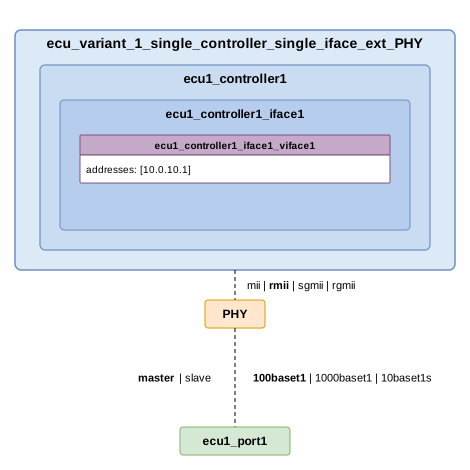
Variant 1: Single controller, single (virtual) interface, external PHY
Find this example on github: ecu_variant_1.
Note
The MDI configuration must be compliant with that of the other ECU to which the port is connected to. In this case, mode, speed and duplex must match; while role must be opposite to that of the other ECU config (i.e., if slave in the connected ECU, master shall be configured).
Note
The MII configuration must be compliant with that of the ECU controller configuration. In this case, type and speed must match; while mode must oppose the controller interface config (i.e., if mac in the controller interface, phy shall be configured).
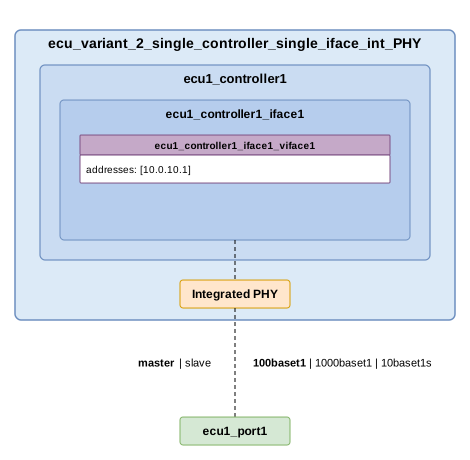
Variant 2: Single controller, single (virtual) interface, integrated PHY
Find this example on github: ecu_variant_2.
Note
Since PHY is integrated into the host controller, no MII configuration is needed neither on the port side, nor on the controller side.
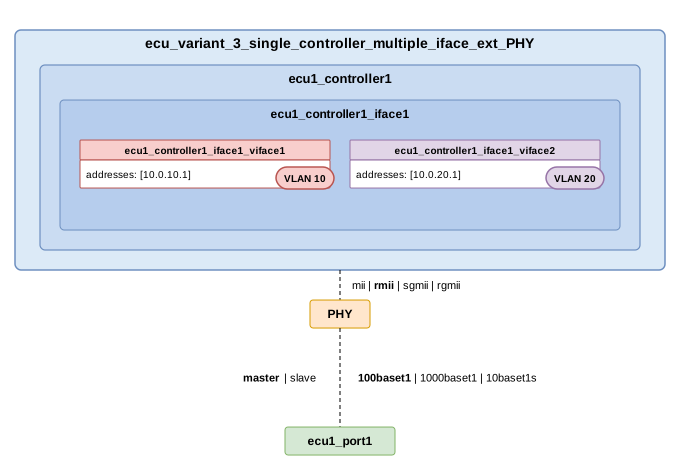
Variant 3: Single controller, multiple (virtual) interfaces, external PHY
Find this example on github: ecu_variant_3.
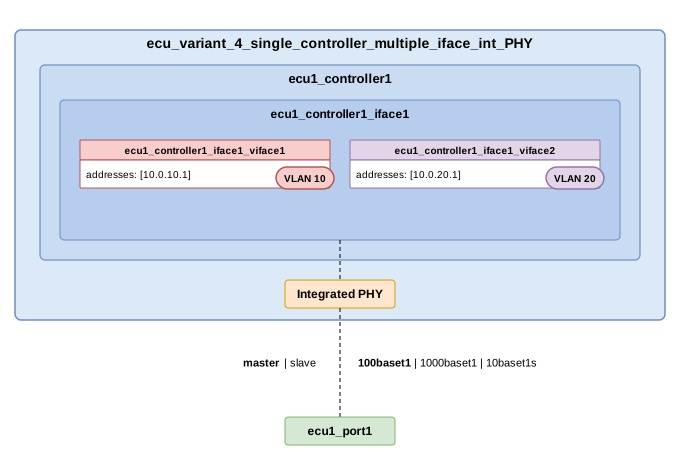
Variant 4: Single controller, multiple (virtual) interfaces, integrated PHY
Find this example on github: ecu_variant_4.
Variant 5: Single controller, single (physical) interface, external PHY, Multiple VMs
Find this example on github: ecu_variant_5.
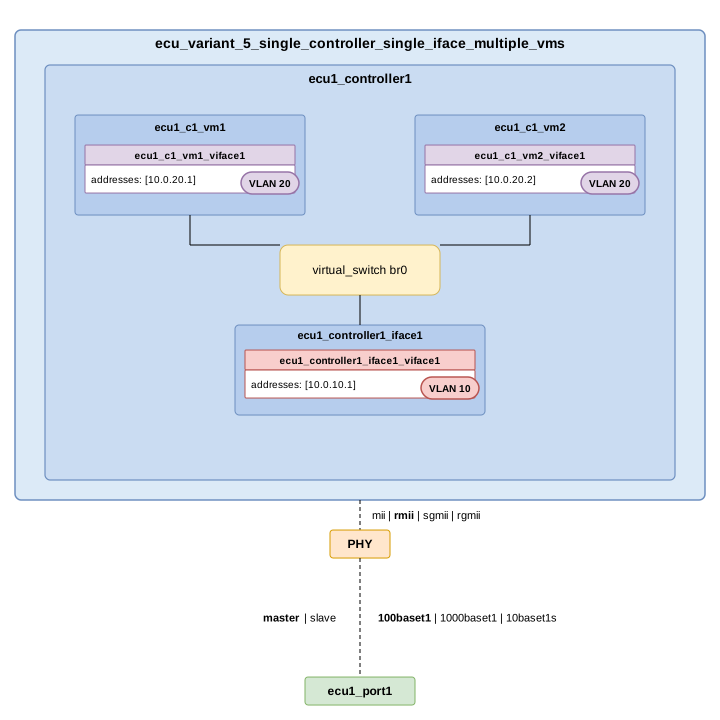
Note
If there is a VM, it needs to tie to a Controller Interface through a Virtual Switch.
Variant 6: Single controller, multiple (physical) interface, external PHY no VMs, Virtual Switch
Find this example on github: ecu_variant_6.
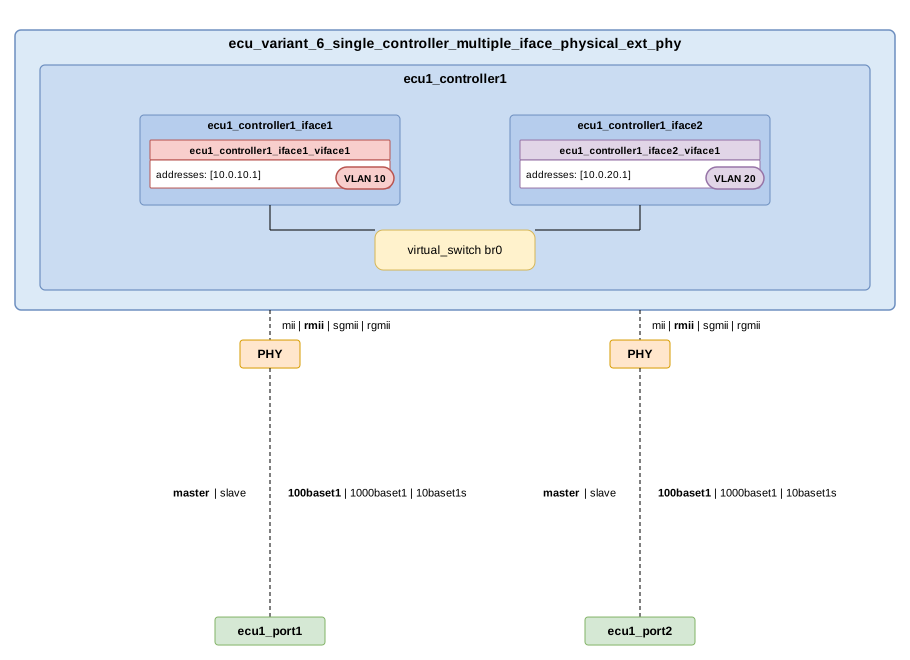
Note
Two controller interfaces might be connected through an Virtual Switch.
Variant 7: Switch ECU, multiple (virtual) interfaces, external PHY
Find this example on github: ecu_variant_7.
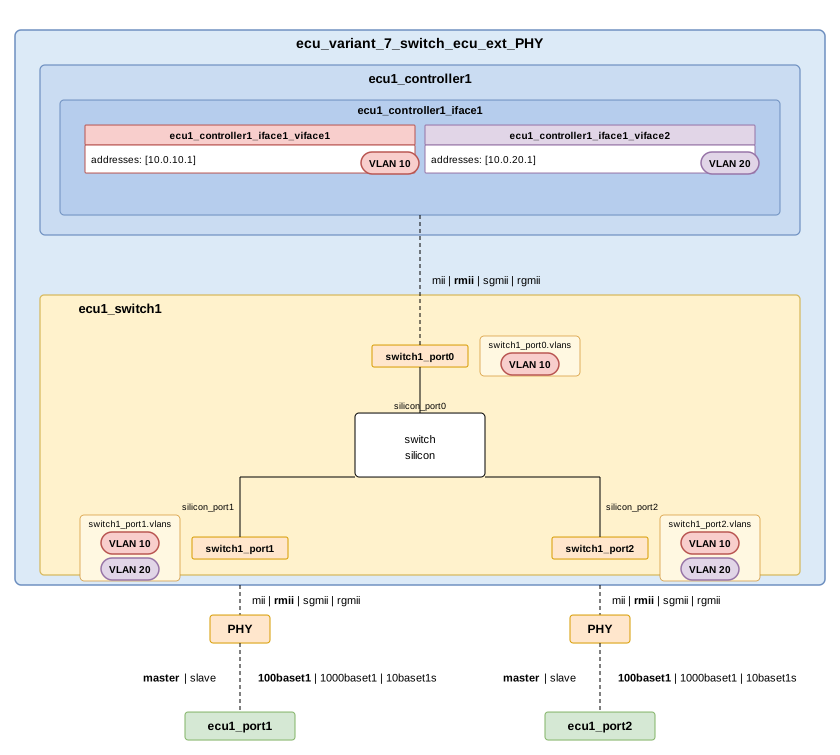
Note
The MII mode of the switch1_port0 must oppose the one of the ecu1_controller1_iface1.
Variant 8: Switch ECU with Host controller, multiple (virtual) interfaces, external PHY
Find this example on github: ecu_variant_8.
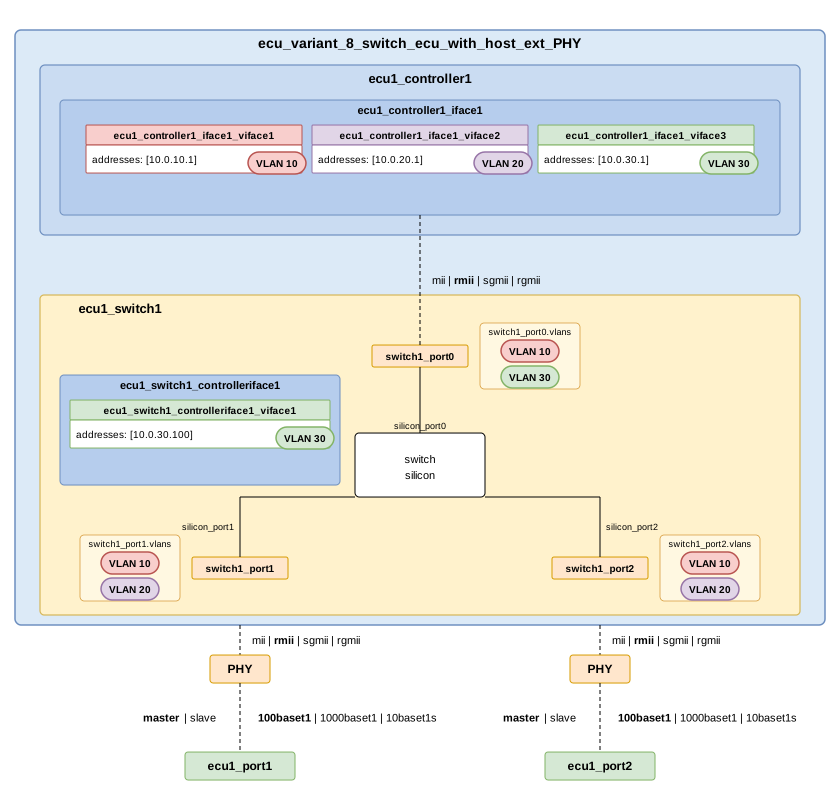
Note
The MII mode of the switch1_port0 must oppose the one of the ecu1_controller1_iface1.
Note
The Host controller of the switch will have the same configuration as any Controller Interface.
Variant 9: Single controller, single Ethernet interface and a CAN interface
Find this example on github: ecu_variant_9.
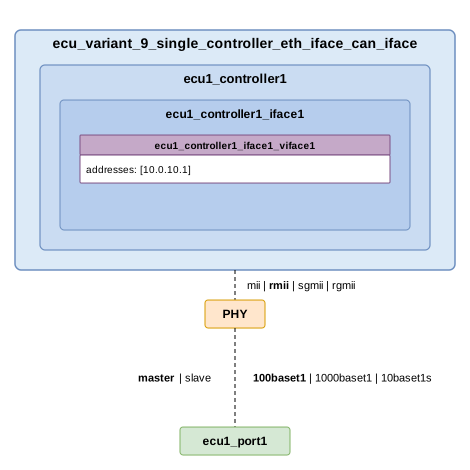
Note
A single controller can host a CAN interface alongside its Ethernet interface. The Ethernet interface has its own ECU port and external PHY; the CAN interface instead joins a bus via bus_ref and lists the frames it exchanges through sender_frames / receiver_frames.
Note
Several CAN frames share the single BodyCAN bus. The frames are defined once on the bus under communication/channels/can/, and the CAN interface references them by their frame_ref (the CAN identifier).
Variant 10: Single controller, switch inside controller, several nested compute nodes
Find this example on github: ecu_variant_10.
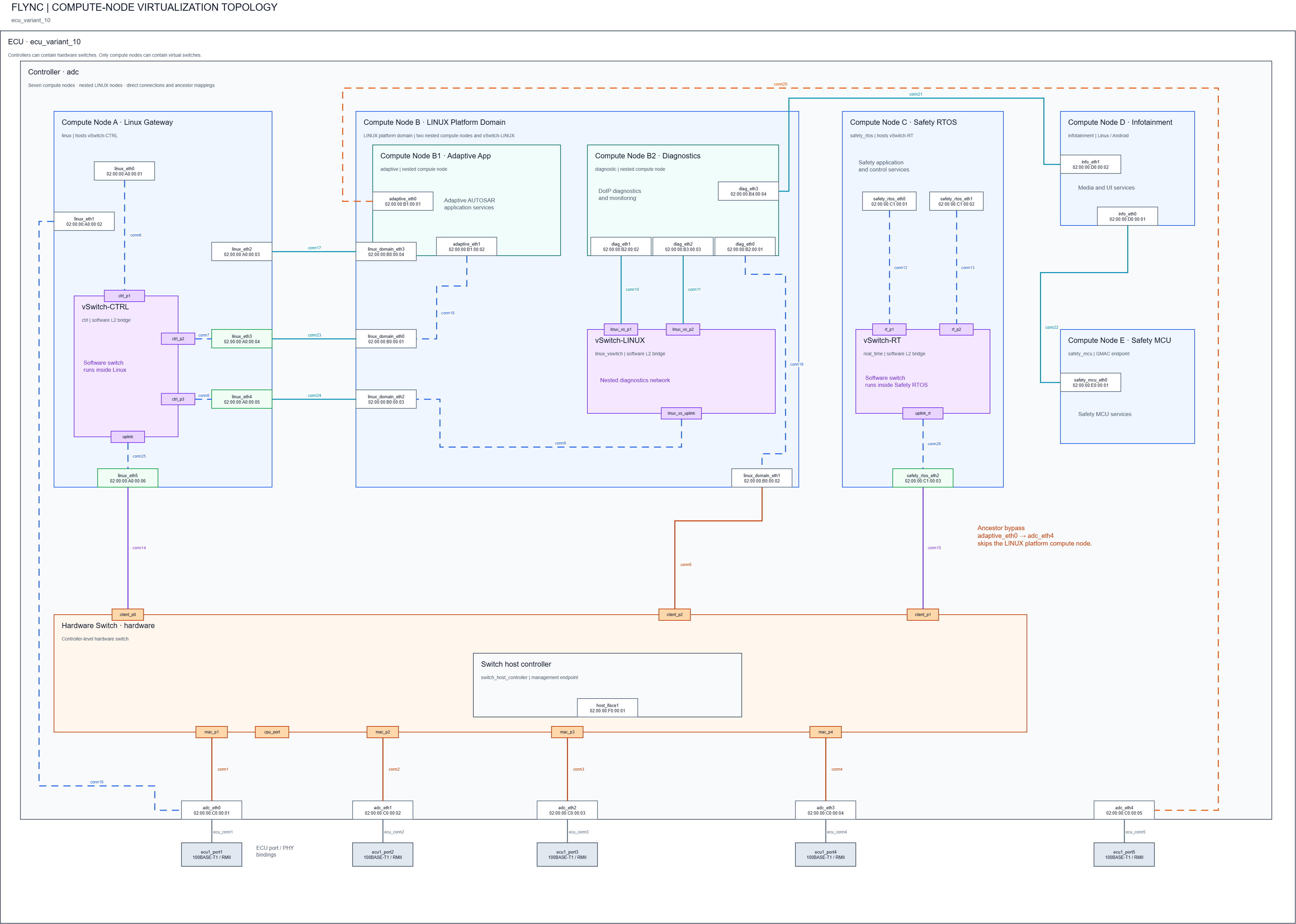
Note
A single controller (adc) hosts a hardware switch, giving the controller and its compute nodes a shared internal switching fabric alongside their Ethernet interfaces.
Note
Compute nodes can nest arbitrarily: the linux_domain compute node itself hosts the adaptive and diagnostic compute nodes, each with its own Ethernet interfaces. Other compute nodes of the controller (linux, safety_mcu, safety_rtos) sit alongside it at the same level.
Note
Compute nodes such as linux, linux_domain and safety_rtos each define their own virtual switch, connecting their Ethernet interfaces independently from the controller’s hardware switch.
Internal Topology (Configuration and Types)
The internal topology file of each configured ECU must contain the description of all the internal connections within the device. The FLYNC model supports the connection types present in the following picture:
Important
Be aware of the kind of connection that is added to the file, since the name of the components shall adjust to it accordingly.
Example file (dummy example)
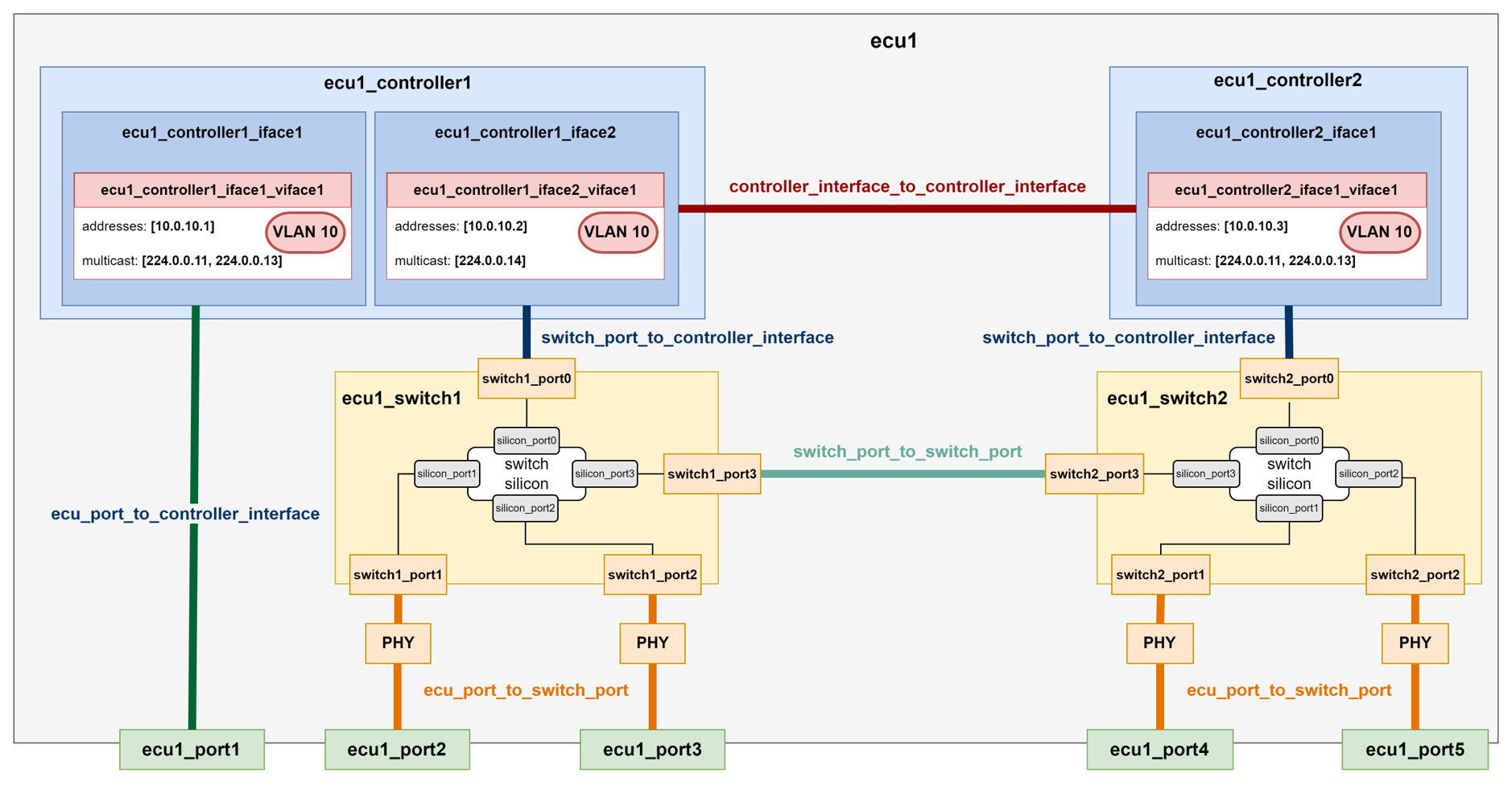
📄 ecu1_internal_topology.flync.yaml
connections:
   -  type: ecu_port_to_switch_port
      id: conn1
      ecu_port: ecu1_port2
      switch_port: switch1_port1
   -  type: ecu_port_to_switch_port
      id: conn2
      ecu_port: ecu1_port3
      switch_port: switch1_port2
   -  type: ecu_port_to_switch_port
      id: conn3
      ecu_port: ecu1_port4
      switch_port: switch2_port1
   -  type: ecu_port_to_switch_port
      id: conn4
      ecu_port: ecu1_port5
      switch_port: switch2_port2
   -  type: ecu_port_to_controller_interface
      id: conn5
      ecu_port: ecu1_port1
      controller_interface: ecu1_controller1_iface1
   -  type: switch_port_to_controller_interface
      id: conn6
      switch_port: switch1_port0
      controller_interface: ecu1_controller1_iface2
   -  type: switch_port_to_controller_interface
      id: conn7
      switch_port: switch2_port0
      controller_interface: ecu1_controller2_iface1
   -  type: controller_interface_to_controller_interface
      id: conn8
      controller_interface: ecu1_controller1_iface2
      controller_interface2: ecu1_controller2_iface1
   -  type: switch_port_to_switch_port
      id: conn9
      switch_port: switch1_port3
      switch2_port: switch2_port3
Additional Security Features Configuration
Firewall Configuration
The Firewall model consists of a default action and three lists defining rules for input, output and forward traffic, respectively. Each of these rules contains a pattern the packets are matched against, and an action executed when this check is positive:
📄 ecu1_controller1.flync.yaml
meta:
   author: Developer1
   compatible_flync_version:
      version_schema: semver
      version: 0.11.0
name: ecu1_controller1
interfaces:
   -  name: ecu1_controller1_iface1
      mac_address: 00:11:22:33:44:88
      mii_config:
      type: rmii
      speed: 100
      mode: mac
      virtual_interfaces:
      -  name: ecu1_controller1_iface1_viface1
         vlanid: 0
         addresses:
            -  address: 10.0.10.3
               ipv4_netmask: 255.255.255.0
      firewall:
         default_action: drop
         input_rules:
            -  name: allow_ssh
               action: accept
               pattern:
               src_ipv4: 10.0.0.2
               protocol: tcp
               dst_port: 22
               vlan_tagged: true
         output_rules:
            -  name: drop_output_vlan_33
               action: drop
               pattern:
               dst_ipv4:
                  address: 10.0.0.1
                  ipv4netmask : 255.255.255.0
               vlanid: 33
         forward_rules:
            -  name: allow_forwarded_udp
               action: accept
               pattern:
               src_ipv4:
                  address: 10.0.0.2
                  ipv4netmask : 255.255.255.0
               dst_ipv4:
                  address: 10.0.0.3
                  ipv4netmask : 255.255.255.0
               protocol: udp
               dst_port:
                     from_value: 30490
                     to_value: 30509
Switch TCAM Configuration
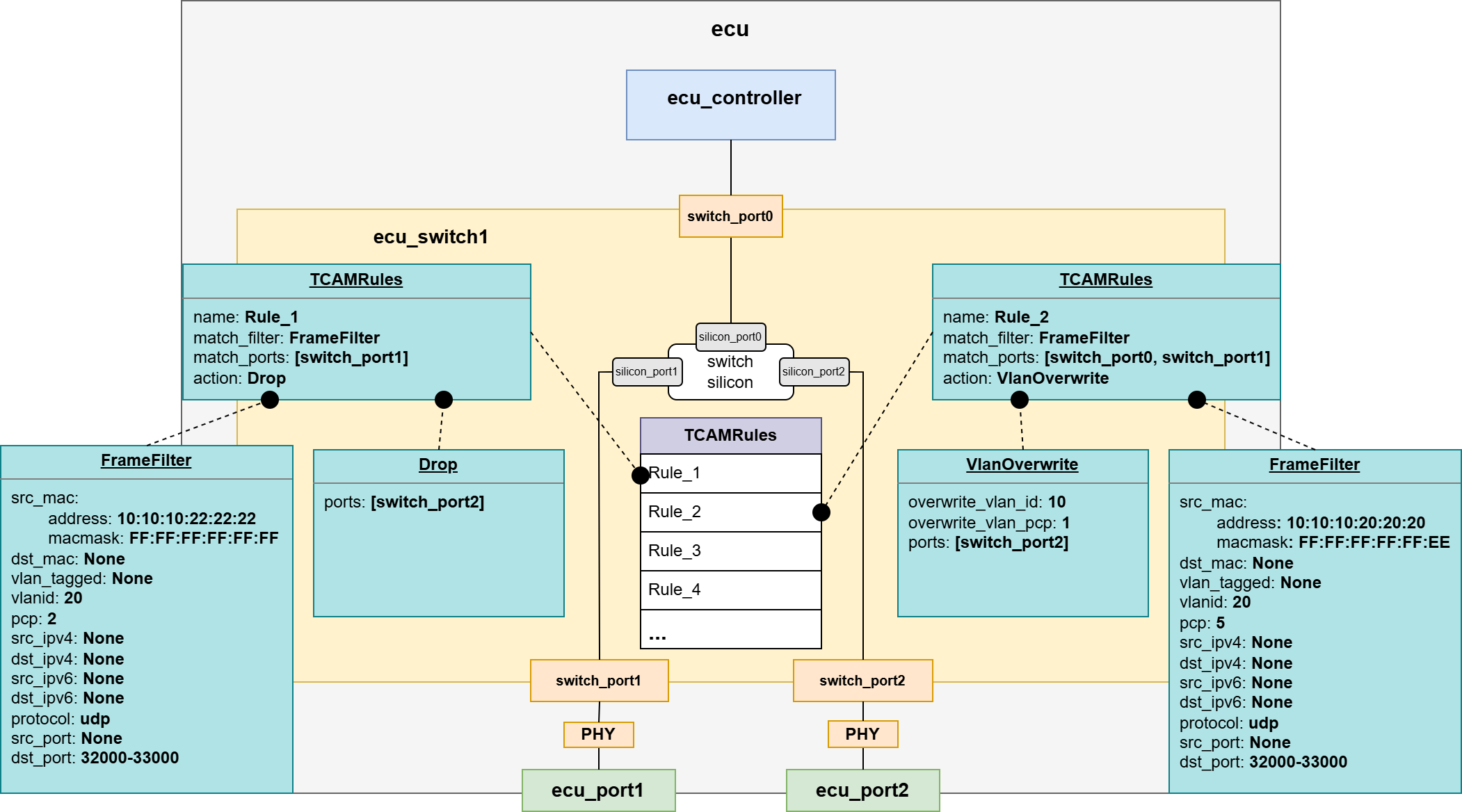
📄 ecu1_switch1.flync.yaml
meta:
   author: Developer1
   compatible_flync_version:
      version_schema: semver
      version: 0.11.0
name: ecu_switch1
ports:
-  name: switch_port0
   silicon_port_no: 1
   default_vlan_id: 1
   mii_config:
      type: rmii
      speed: 100
      mode: mac

-  name: switch_port1
   silicon_port_no: 2
   default_vlan_id: 1
   mii_config:
      type: rmii
      speed: 100
      mode: mac

-  name: switch_port2
   silicon_port_no: 3
   default_vlan_id: 1
   mii_config:
      type: rmii
      speed: 100
      mode: mac

tcam_rules:
   -  name: Rule_1
      match_filter:
      src_mac:
         address: "10:10:10:22:22:22"
         macmask: "FF:FF:FF:FF:FF:FF"
      vlanid: 20
      pcp: 2
      protocol: udp
      dst_port:
         from_value: 32000
         to_value: 33000
      match_ports: [switch_port1]
      action:
      -  type: drop
         ports: [switch_port2]

   -  name: Rule_2
      match_filter:
      src_mac:
         address: "10:10:10:20:20:20"
         macmask: "FF:FF:FF:FF:FF:EE"
      vlanid: 20
      pcp: 5
      protocol: udp
      dst_port:
         from_value: 32000
         to_value: 33000
      match_ports: [switch_port0, switch_port1]
      action:
         -  type: vlan_overwrite
            overwrite_vlan_id: 10
            overwrite_vlan_pcp: 1
            ports: [switch_port2]

vlans:
-  name: VLAN10
   id: 10
   default_priority: 1
   ports:
      - switch_port0
      - switch_port1
      - switch_port2

-  name: VLAN20
   id: 20
   default_priority: 1
   ports:
      - switch_port0
      - switch_port1
      - switch_port2
Sockets Configuration
A socket in FLYNC represents a logical endpoint on a virtual network interface of an ECU. It defines how the controller will send and receive traffic over a specific IP address, port, and protocol (TCP/UDP).

Note
Sockets must be defined in a separate folder for each ECU for better readability.
Note
Multiple sockets may be defined in a single file for different address endpoints, but they must belong to the same VLAN.
Signals
A Signal is the smallest data element in the FLYNC model: a single value with its bit length, optional linear scaling (factor / offset / unit) and limits, and an optional value_encoding that maps raw values to labels (text_table, bitfield_text_table or bitmask_flags). Signals are bus-agnostic and are placed into a PDU through a signal instance that fixes the bit_position and endianness.

📄 communication/channels/pdus/PDU_EngineStatus.flync.yaml
name: PDU_EngineStatus
type: standard
length: 8
description: >-
  Engine speed, torque, coolant temperature and operating state.
  Transmitted cyclically at 10 ms by EngineECU on PowertrainCAN.

signals:
  - bit_position: 0
    endianness: LE

    signal:
      name: EngineSpeed
      description: Crankshaft rotational speed.
      bit_length: 16
      data_type: uint16
      factor: 0.25
      offset: 0.0
      lower_limit: 0.0
      upper_limit: 16383.75
      unit: rpm
      value_encoding:
        type: text_table
        entries:
          - value: 65535
            label: Signal_Not_Available

  - bit_position: 16
    endianness: LE

    signal:
      name: EngineTorque
      description: Indicated engine torque at crankshaft.
      bit_length: 16
      data_type: int16
      factor: 0.1
      offset: 0.0
      lower_limit: -3276.8
      upper_limit: 3276.7
      unit: Nm
  - bit_position: 32
    endianness: LE

    signal:
      name: EngineCoolantTemp
      description: Engine coolant temperature.
      bit_length: 8
      data_type: uint8
      factor: 1.0
      offset: -40.0
      lower_limit: -40.0
      upper_limit: 215.0
      unit: degC
      value_encoding:
        type: text_table
        entries:
          - value: 254
            label: Sensor_Error
          - value: 255
            label: Signal_Not_Available
  - bit_position: 40
    endianness: LE

    signal:
      name: EngineStatus
      description: Engine operating state.
      bit_length: 4
      data_type: uint8
      value_encoding:
        type: text_table
        entries:
          - value: 0
            label: Stopped
          - value: 1
            label: Cranking
          - value: 2
            label: Running
          - value: 3
            label: Stall
          - value: 15
            label: Error
Note
Signals are defined inline inside the PDU that carries them, under communication/channels/pdus/.
PDUs
A PDU (Protocol Data Unit) is the container that groups signals for transmission. PDUs are defined independently of any bus and stored under communication/channels/pdus/ (Ethernet container PDUs live in communication/channels/ethernet_pdu_containers/). A frame, a socket, or another PDU then references a PDU by name.
Three PDU types are distinguished by the type discriminator:
standard- a non-multiplexed PDU carrying a flat list of signal instances.multiplexed- a PDU with aselector_signalwhose value selects whichmux_groupsblock of signals is active on each transmission cycle.container- a Container PDU that packs several other PDUs into one payload, each contained PDU prefixed by a per-slot header.

Multiplexed PDU
PDU_TransmissionStatus multiplexes on the 4-bit GearInfoMux selector: selector value 0 activates the gear-position signals, value 1 the torque-converter signals.
📄 communication/channels/pdus/PDU_TransmissionStatus.flync.yaml
name: PDU_TransmissionStatus
type: multiplexed
length: 8
description: Transmission status, multiplexed on GearInfoMux selector.

selector_signal:
  bit_position: 0
  endianness: LE
  signal:
    name: GearInfoMux
    description: Multiplexer selector for TransmissionStatus PDU.
    bit_length: 4
    data_type: uint8

mux_groups:
  - selector_value: 0
    pdu:
      name: PDU_TransmissionStatus_Gear
      type: standard
      length: 8
      signals:
        - bit_position: 8
          endianness: LE

          signal:
            name: CurrentGear
            description: Currently engaged gear.
            bit_length: 8
            data_type: uint8
            value_encoding:
              type: text_table
              entries:
                - value: 0
                  label: Park
                - value: 1
                  label: Reverse
                - value: 2
                  label: Neutral
                - value: 3
                  label: Drive_D1
                - value: 4
                  label: Drive_D2
                - value: 5
                  label: Drive_D3
                - value: 6
                  label: Drive_D4
        - bit_position: 16
          endianness: LE

          signal:
            name: GearShiftMode
            description: Automatic / manual / sport shift mode.
            bit_length: 4
            data_type: uint8
            value_encoding:
              type: text_table
              entries:
                - value: 0
                  label: Automatic
                - value: 1
                  label: Manual
                - value: 2
                  label: Sport
  - selector_value: 1
    pdu:
      name: PDU_TransmissionStatus_Torque
      type: standard
      length: 8
      signals:
        - bit_position: 8
          endianness: LE

          signal:
            name: TorqueConverterSlipSpeed
            description: Slip speed of the torque converter.
            bit_length: 16
            data_type: uint16
            factor: 0.1
            offset: 0.0
            unit: rpm
        - bit_position: 24
          endianness: LE

          signal:
            name: TorqueConverterLockup
            description: Torque converter lock-up clutch state.
            bit_length: 2
            data_type: uint8
            value_encoding:
              type: text_table
              entries:
                - value: 0
                  label: Open
                - value: 1
                  label: Slipping
                - value: 2
                  label: Locked
                - value: 3
                  label: Error
Container PDU
EthPowertrainContainer bundles three application PDUs - PDU_EngineStatus, PDU_VehicleDynamics and PDU_TransmissionStatus - into one Ethernet payload. The per-slot header gives the bit widths of the PDU-ID and length fields, and each contained PDU declares its pdu_id and byte offset inside the container.
📄 communication/channels/ethernet_pdu_containers/eth_powertrain_container.flync.yaml
name: EthPowertrainContainer
type: container
pdu_id: 1
length: 31
header:
  id_length_bits: 16
  length_field_bits: 8
description: >-
  Container PDU bundling powertrain PDUs (engine status, vehicle dynamics,
  transmission state) into a single Ethernet payload.

contained_pdus:
  - pdu_id: 257
    pdu_ref: PDU_EngineStatus
    offset: 0
  - pdu_id: 513
    pdu_ref: PDU_VehicleDynamics
    offset: 11
  - pdu_id: 769
    pdu_ref: PDU_TransmissionStatus
    offset: 20
Note
The communication/channels/pdus/ directory is optional and may be omitted when no PDUs are defined.
CAN Buses
A CAN Bus carries frames between controllers. Each bus is stored in its own file under communication/channels/can/ and defines the bus-level parameters plus the full list of frames transmitted on it. Both classical CAN and CAN FD are supported by the same bus type: setting fd_enabled: true (together with an fd_baud_rate) permits can_fd frames with payloads up to 64 bytes and an optional bit-rate switch.
Each frame references its payload PDU by name via packed_pdus and may carry an optional timing block driving cyclic and event-driven transmission.
DiagCAN is a CAN FD bus (500 kbit/s nominal, 2 Mbit/s data phase). Its can_fd frames set bit_rate_switch and carry 64-byte diagnostic payloads. It also carries the Network Management frame documented in the NM example.
📄 communication/channels/can/diag_can.flync.yaml
name: DiagCAN
description: Diagnostics bus at 500 kbit/s nominal / 2 Mbit/s data phase (CAN FD).
version: "1.0"
baud_rate: 500000
fd_enabled: true
fd_baud_rate: 2000000

frames:

  - name: Frame_LightDiagRequest
    type: can_fd
    description: Functional diagnostic request, CAN FD 64-byte payload.
    length: 64
    can_id: 2015         # 0x7DF
    id_format: standard_11bit
    bit_rate_switch: true
    error_state_indicator: false
    packed_pdus:
      - pdu_ref: PDU_CabinLight
        bit_position: 0

  - name: Frame_EngineDiagResponse
    type: can_fd
    description: Diagnostic response from HPC, CAN FD 64-byte payload.
    length: 64
    can_id: 2024         # 0x7E8
    id_format: standard_11bit
    bit_rate_switch: true
    error_state_indicator: false
    packed_pdus:
      - pdu_ref: PDU_EngineStatus
        bit_position: 0

  # --------------------------------------------------------------------------
  # Frame: NmMessage (0x500, 8 bytes, sent cyclically by HPC, the sole modeled
  # NM-sending ECU on this bus). Tagged frame_usage: network_management;
  # carries PDU_NmMessage. Receivers are implicit external NM peers because HPC
  # is the only DiagCAN-connected ECU in this workspace; in a multi-ECU CAN
  # setup, peer ECUs would add Frame_NmMessage under receiver_frames on their
  # own DiagCAN interface.
  # --------------------------------------------------------------------------
  - name: Frame_NmMessage
    type: can
    frame_usage: network_management
    description: >-
      Network Management frame on DiagCAN. Sent cyclically by HPC, the sole
      NM-sending ECU modeled in this workspace. Carries the ordinary NM PDU
      (PDU_NmMessage) as its payload.
    length: 8
    can_id: 1280         # 0x500
    id_format: standard_11bit
    packed_pdus:
      - pdu_ref: PDU_NmMessage
        bit_position: 0
    timing:
      cyclic_timings:
        - cycle: 0.5
      event_timings: []
Which frames a controller sends and receives is declared on its CAN interface, one file per bus, where frames are referenced by bus_ref and their numeric frame_ref (the CAN ID). On DiagCAN, high_performance_compute sends the diagnostic-response and Network-Management frames and receives the diagnostic request:
📄 ecus/high_performance_compute/controllers/hpc_controller1/can_interfaces/diag_can_interface.flync.yaml
bus_ref: DiagCAN
sender_frames:
  - bus_ref: DiagCAN
    frame_ref: 2024  # Frame_EngineDiagResponse (0x7E8)
  - bus_ref: DiagCAN
    frame_ref: 1280  # Frame_NmMessage (0x500)
receiver_frames:
  - bus_ref: DiagCAN
    frame_ref: 2015  # Frame_LightDiagRequest (0x7DF)
Note
The communication/channels/can/ directory is optional and may be omitted when no CAN buses are defined.
Network Management (NM)
The example illustrates how vendor-neutral state management membership is configured around vehicle functions (AutonomousDriving, Comfort, …). Instead of per-node NM identity, each participant declares which function it contributes to, and several nodes may share the same function. The example spans Ethernet, CAN, and LIN within one vehicle-wide state management group, VEHICLE (see flync_4_nm for the model).
The NM message is modeled as an ordinary PDU (PDU_NmMessage) with ordinary signals:
sender_id(uint8) - identifies the sending node.control_vector(uint8) - control bits of the NM message:repeat_message_request,sleep_ready,active_wakeup, andrelevance_vector_present.relevance_vector(uint32) - a relevance bitmask whose flags are vehicle functions (AutonomousDriving,OnlineCommunication,Comfort), not nodes. A participant references the function bit it contributes to; several ECUs may share the same function bit, and one ECU may reference several. The set of flags always matches the derived participant bits of this workspace.user_data(bytearray, 2 bytes) - opaque OEM/application extension area.
Hint: This layout is one illustrative arrangement - FLYNC prescribes no NM PDU format. Each field is an ordinary signal at a configurable bit_position, so a workspace can reorder, resize or rename them (e.g. swap sender id and control vector) to match its stack.
The PDU is flagged pdu_usage: network_management regardless of which transport technology carries it.
State management group
The group registry lives in communication/state_management/groups.flync.yaml (with the reusable timing profiles in timing_profiles.flync.yaml); memberships are declared entity-side only. The workspace exercises every use case:
Use case |
Where to look |
|---|---|
Controller-level membership (recommended site); one ECU owning several
function bits ( |
|
ECU-level membership; several ECUs sharing one function bit ( |
|
Bus-level membership - the LIN bus participates as one bit with no NM frame (master-as-proxy) |
|
Gateway use case - receives the NM PDU on Ethernet and forwards it onto
BodyCAN via ordinary |
|
Switch use case - the switch-core controller observes the group |
|
Derived proxy - |
|
Ethernet NM
The VEHICLE NM PDU (PDU_NmMessage) is wrapped in an Ethernet Container PDU (eth_nm_container_a) and bound to a UDP socket via the pdu_sender / pdu_receiver deployment types:
Sender -
high_performance_computetransmits the NM container multicast on VLAN 40, group224.0.0.1, UDP port 1200, and also receives it viapdu_receiverso it can observe the group state.Receivers -
zonal_platform1,zonal_platform2, andzonal_gatewayreceive it viapdu_receiversockets on the same VLAN and multicast group.
As an alternative way, the NM PDU (PDU_NmMessage) can be attached to a Ethernet Container PDU (available as example eth_nm_container_b) which does not carry a PDU Header, as header/id_length_bits & length_field_bits are configured with length zero (0), to be sent as a raw UDP payload as example Use-Case.
CAN NM
On BodyCAN, the VEHICLE group follows the classic CAN pattern: zonal_gateway feeds Frame_Nm_Gateway (forwarding the NM PDU from Ethernet onto BodyCAN), while can_node_1 / can_node_2 each transmit their own NM frame and receive the others. All three contribute to the Comfort function, so they share the Comfort relevance bit - requesting Comfort keeps them awake together, which is how CAN resolves NM state per function.
DiagCAN carries the vehicle NM PDU (PDU_NmMessage) in Frame_NmMessage, tagged frame_usage: network_management, sent by high_performance_compute - a second CAN bus of the same VEHICLE group. It is a plain diagnostics bus otherwise; it declares no membership of its own.
LIN NM
BodyLIN (the body bus - exterior mirrors and cabin ambient lighting) takes part through a bus-level membership: the whole bus joins the VEHICLE group as one participant on the Comfort function, without a LIN frame of its own. Its master (zonal_platform1) receives the group state on Ethernet (pdu_receiver) and drives the LIN bus to sleep with it; validation resolves the master as the bus’s representative automatically.
Instrumentation (Measurement Points)
The instrumentation overlay taps buses and links with measurement points for network analyzers such as ASAM CMP or TECMP (see flync_4_instrumentation for the model). It is optional - a workspace that is not being instrumented simply has no instrumentation/ folder, in which case flync_model.instrumentation stays None.
When present, the points are declared in instrumentation/measurement_points.flync.yaml. Each point is identified by a unique name and carries an interface_id (per direction for Ethernet port taps); every interface id is unique across the overlay. The example exercises all four point types:
Ethernet port tap (``ethernet_ports``) -
gateway_to_hpc_linktaps both ends of the point-to-point link to the HPC in-line, with one interface id per direction.Ethernet shared-medium segment (``ethernet_bus``) -
rear_lamp_segment_bustaps the rear-lamp 10BASE-T1S multidrop segment.CAN bus (``can_bus``) -
body_cantapsBodyCAN(classicalcanpayloads) anddiagnostics_can_fdtapsDiagCAN(canandcan_fdpayloads).LIN bus (``lin_bus``) -
body_lintaps theBodyLINbus.
📄 instrumentation/measurement_points.flync.yaml
- name: gateway_to_hpc_link
  type: ethernet_ports
  description: Inline tap of both ends of the link to the HPC, one interface id per direction.
  ports:
    - ecu_port: zgw_p1
      interface_id: 0x00010001
    - ecu_port: hpc1_p5
      interface_id: 0x00010002

- name: rear_lamp_segment_bus
  type: ethernet_bus
  description: Tap of the rear-lamp 10BASE-T1S multidrop segment.
  bus: RearLampSegment
  interface_id: 0x00010003

- name: body_can
  type: can_bus
  description: Tap of the body CAN bus.
  bus: BodyCAN
  payload_types:
    - can
  interface_id: 0x00020001

- name: diagnostics_can_fd
  type: can_bus
  description: Tap of the diagnostics CAN FD bus.
  bus: DiagCAN
  payload_types:
    - can
    - can_fd
  interface_id: 0x00020002

- name: body_lin
  type: lin_bus
  description: Tap of the body LIN bus.
  bus: BodyLIN
  interface_id: 0x00020003